
Map your Notion workspace in 30 seconds
Your databases become islandsFree tool100% local and private
Drop your Notion export here
A .zip file exported as “Markdown & CSV”.
No account. No Notion connection. Nothing to authorise.
Before setting sail
Export your Notion workspace
Archipelago is a visual mapping tool for Notion workspaces, built from their Markdown and CSV exports. It turns the databases and the relations actually present in the export into an interactive map.
Your export stays in your browser. No account, no upload, no storage. Learn more
Archipelago does not need access to your Notion account. You simply give it an export of your workspace.
- In Notion, open Settings, then Workspace, section General.
- Click Export all workspace content.
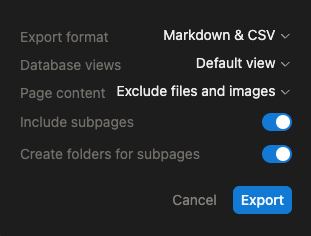
- Choose Markdown & CSV, database views Default view, and exclude files and images.
- Turn on Include subpages and Create folders for subpages.
Notion hands you a .zip file. Drop it into Archipelago as it is.
Only want to map part of your workspace? You can also export a single page or a teamspace. Archipelago will map that scope and nothing else.
Read the full export guideReading the map
Your workspace becomes an archipelago
Archipelago turns the structure of your Notion workspace into a nautical chart. Every element matches something actually found in your export.
Legend
An island
A database. Its size follows how many entries it holds: a few rows make an islet, several hundred take up more ground.
The hatching
How full the database is. The more its entries have their properties filled in, the denser the island looks.
A shipping route
A relation actually in use between two databases. An empty relation leaves no trace in a Notion export, so it does not appear on the map.
A convoy
How many links travel a route. A few links bring out a small sailboat. The busiest routes carry larger ships.
A lighthouse
The main hub of the archipelago. It marks the database that the largest number of links on the map converge on.
A black flag
An isolated database. No relation in use connects it to the other databases on the map. That is not necessarily a problem: some databases are meant to stand alone.
This is not an audit
Archipelago knows nothing about your processes, or how much a database matters to your business. It shows the structure. You read it.
The map shows what is actually used
An empty relation does not appear: Archipelago shows the workspace as it is filled in, not only as it was designed.
WebMCP compatible
Your AI agent can take the helm too
In a WebMCP compatible browser, an AI agent can work with Archipelago directly. It can draw a map, read the one on screen, highlight certain databases or add notes to them.
Archipelago then highlights what it found on the map itself, while you watch.
Archipelago with WebMCP
- Show me everything connected to Clients.
- Which databases are isolated from the rest?
- Show me the dependencies around Projects.